Would you look in the box?
A story about Jira Data Center Issue Archiving

Principles
- Trust in AI-powered
- Error recovery
- User control
- Transparency
At a glance
- Product
- Jira Data Center, the self-hosted Jira for Atlassian's largest enterprise customers
- My role
- End-to-end UX designer, in a triad with a product manager and an engineering manager
- Problem
-
The largest Jira instances held 7 million issues, with a loading time of around 9 seconds (!). For regular users, millions of tickets were painful to search through. Maintenance work for the admins, like re-indexing, took a long time.
Admins didn't have any way to store away old tickets safely and still give users access to them at all times. There wasn't an easy way to restore them either, even with costly software.
- What shipped
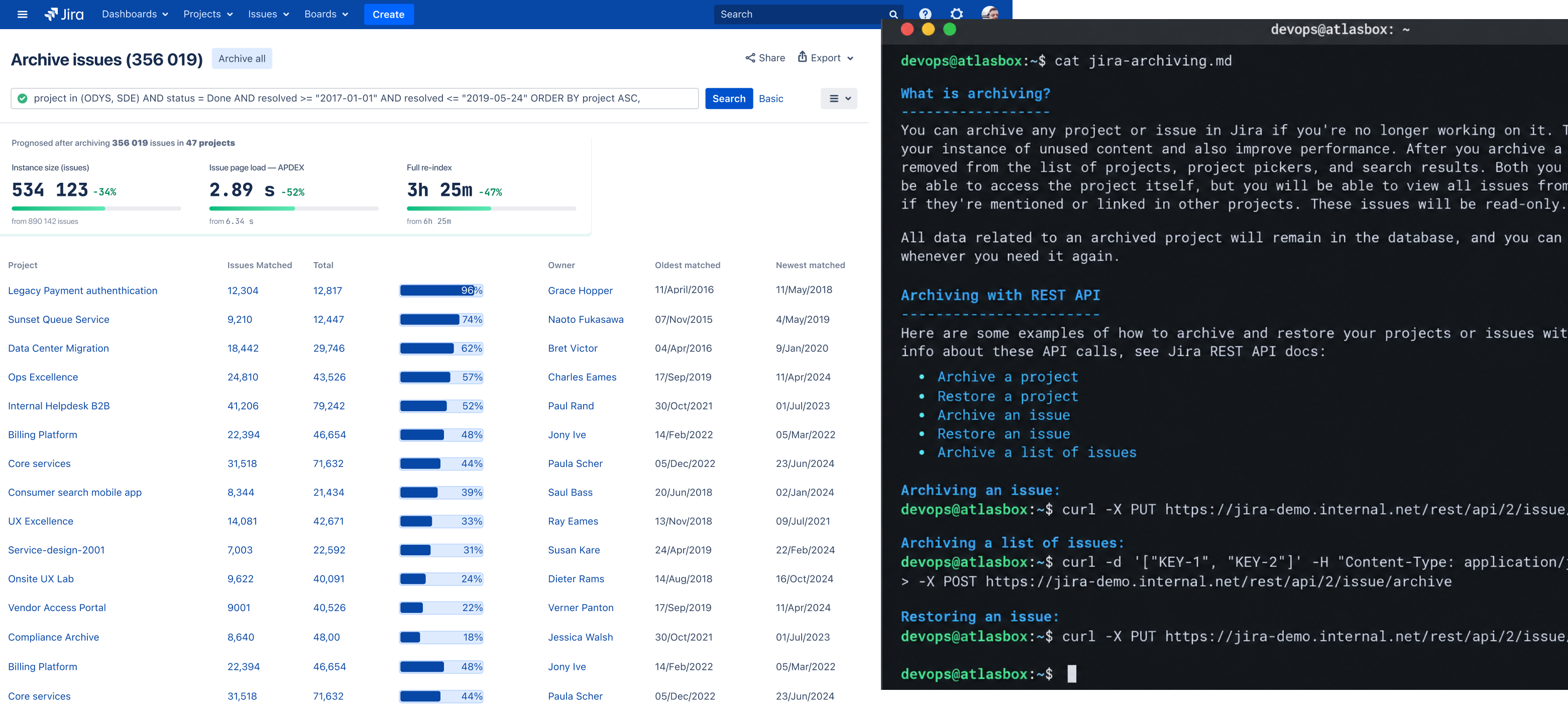
- Archiving through Jira's existing bulk-change flow, a new Archived issues page with filters, export and restore, and an API for automation. Supported by a detailed documentation co-created with Technical Writer.
Impact
- 1 mln ticketsarchived within 2 months.
- Almost 2× fasterre-indexing: from a full working day to half a day.
- 28% fastersearches.
A product as old as Windows XP
Jira 1.0 shipped in 2002, the same year as Windows XP. Almost two decades later, Jira Data Center runs on the servers of some of the world's largest companies. Each instance (a company’s own Jira installation) carries years of custom workflows, Marketplace apps, integrations and automation, layered on top of each other.
At that scale, Jira gets heavy. The instances we studied held from 700,000 to 2 million issues. The largest customer reportedly had around 7 million. We rebuilt an instance with the same structure, using synthetic data, to test archiving. Loading a board took almost 9 seconds, and a full re-index could take up to a day. Re-indexing is the job that keeps Jira’s search up to date as the instance grows.
And when Jira stops, work stops. Industry estimates put the cost of an hour of downtime in the six figures. That's why any large maintenance work (re-indexing) happened on Saturdays. If something went wrong, there was time to fix it before Monday.
- $190 0001 hour of downtime for 5 000 users.
- 7 mln ticketsin the largest instances.
- 9 secondsto load a backlog.

What enterprise customers told us
We started with seven of the largest enterprise customers: global banks, a health insurer and large tech companies. We spoke with senior IT leaders, heads of admin teams and admins who did the work themselves.
We interviewed them. Then, together with the team, I ran a workshop to synthesise the key quotes across themes I had defined upfront. It helped us build empathy.
Admins wanted to archive between a fifth and half of their instance, and nothing they had let them do it safely.
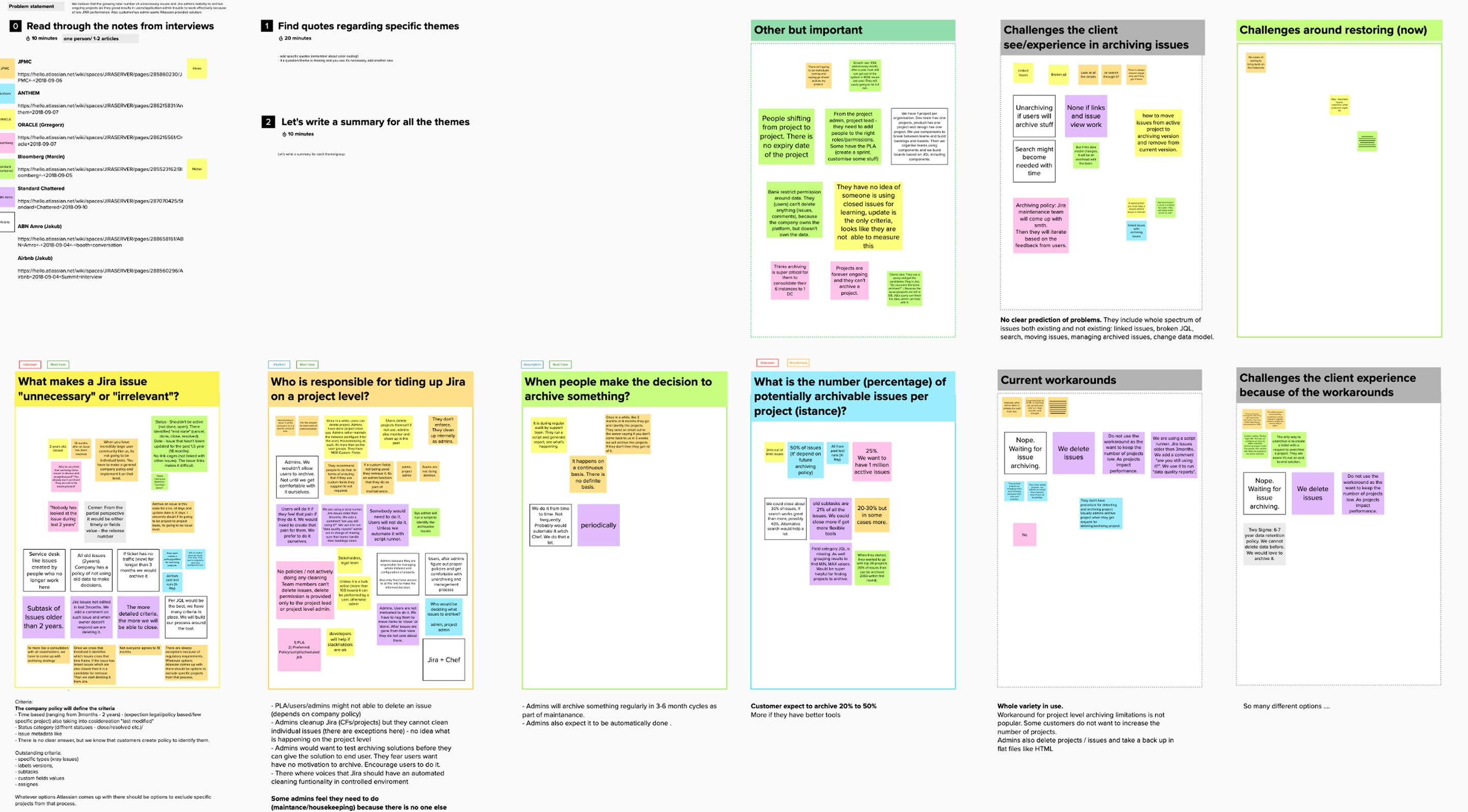
Jira got faster with project archiving. But some customers with really big instances, who could have used it, didn't. Why? What stopped them?
We archived 200 projects. Jira got faster. Indexing didn't.
And for most of them, project archiving didn't fit. Their old issues sat inside projects that were still alive. They had to keep:
- issues that form an audit trail for patent law
- service desk cases that double as knowledge-base articles
- medical histories with x-rays and lab results
- evergreen projects that never close
So they improvised. They hid old issues through permission schemes, bulk-deleted them in chunks with Marketplace add-ons, ran a separate read-only Jira instance, or exported issues as HTML files and then deleted them. One team commented on every ticket older than 90 days, asking whether anyone still used it.
I'd given up on trying to archive tickets entirely… I just delete attachments.
Others did nothing and waited for Jira to solve it. The appetite was big: admins expected to archive 20–50% of their instance, around 300,000–400,000 issues, over the first 6 to 18 months. After that, they'd archive every few months as part of regular maintenance.
Who decides what goes?
The loudest voices were senior leaders, and their answer was clear: the company decides. A policy sets the rule, for example every issue older than 18 months with status Closed. Someone on the admin team applies it with a script. A task automation add-on came up often as the go-to tool.
If we have an extremely large community, no one is going to work on individual issues.
The people who would do the work were less sure. Some admins felt they had to do the housekeeping because there was no one else. They couldn't tell if someone still used old, closed issues. And they wanted to test archiving themselves before giving it to anyone else.
Could everyone help to tidy up? Admins doubted it. Jira is a shared resource: everyone adds to it, nobody tidies it. One admin compared it to people in the USA who drained underground water reserves by drilling more and more wells. Nobody cared, because the water belonged to everyone.
That set the scope. Archiving would be an admin tool, run at scale and driven by a query rather than by clicking through issues. And it needed an API, so admins could plug it into their own automation.
The people who do the work
Most of the stories we heard in the first round of interviews came from senior leaders. We confirmed there was a clear “hair-on-fire” problem to solve. It interfered with growth, they were actively looking for a fix, and no one had found a good solution so far.
But what about mid-market admins? How should archiving work for them, inside Jira? Would they also default to API-first, automated archiving?
That's how I got to meet another segment of admins, people we had barely spoken to. Mid-market admins, working in companies of 250–800 people, with instances of 200,000–700,000 issues. Often an army of one: the kind of expert who had to judge for themselves what to archive, and what search formula to apply to find it.
There was no policy in place to protect them. Instead, they would work with business and project owners one by one and decide what goes.
Three ways to archive
I explored three directions and tested them as wireframe concepts with admins.
The flaw they all shared
Every concept ended in the same place: a search page reading “No issues were found to match your criteria.”
Technically, that's correct. Archived issues leave the search index, so the same query now finds nothing. In the meantime on different occasions the admin would come across reassuring content before any action is taken.
But to an admin who has just archived 12,000 issues, an empty page looks like something went wrong. In the shipped flow, I fixed it with a clear success message at the end.
The bigger gap was what came after. Once archived, issues disappeared, and none of the concepts gave admins a way to see them again in Jira. We offered the option to download a CSV with all the archived tickets, and you could also access them through a direct link. This wasn’t enough.
“I'd just page through a few tickets”
The turning point came from a simple question in testing. Admins wrote their query, saw the result count and still wanted to look. So I asked: don't you trust the query to return the right results?
I would just page through and see a few tickets just to be sure.
At first it sounded like distrust of the system. It was something else. Nobody had archived at this scale before, and there was no checklist and no tool built for the job.
Without a checklist, experts fall back on what they do best: spotting anomalies. They often can't put their criteria into words, but they recognize when something looks off.
And someone has to answer for the result. Paging through a few tickets lets an admin say afterwards: “I reviewed the results before archiving.”
Accountability needs a body.
Think of it this way. You ask a robot to clean your house. It boxes up everything nobody has worn or used in two years, things with no clear owner, and things that are broken. Before it takes the box away, would you open it?

From an easier archive to a visible archive
I tested the concepts with 6 admins. It confirmed the shift. They were technical and wrote JQL without trouble, which answered our earlier question. Bulk archiving and the dedicated flow scored about the same; what worried them was having no place to see archived issues and no way to skim through them.
So as a triad, we made a call. The biggest risk wasn't that archiving took too many steps. It was that admins couldn't see what they had archived.
We decided to reuse the existing bulk-change wizard for archiving and put our effort into a dedicated space for archived issues. I'll be honest: I hoped for a shiny new flow. We ended up reusing bulk-change, yes, the one that remembers Windows XP.
It was the right call. Admins already knew and trusted the wizard, it cost little, and the effort went where the real problem was.
From empty page to… empty page: designing the Archived page
The archive had to work around one technical fact: archived issues leave the search index. That's where the speed comes from, but it also means regular search can't find them. They live only in the database, and querying it directly is slow.
- JQL
- Search index
- Search results
- JQL
- Search index
- Database
Risk: Slow to query
I designed with that constraint instead of hiding it. I think of it as honest friction: the page asks a little more of the admin, so it can stay fast and tell the truth.
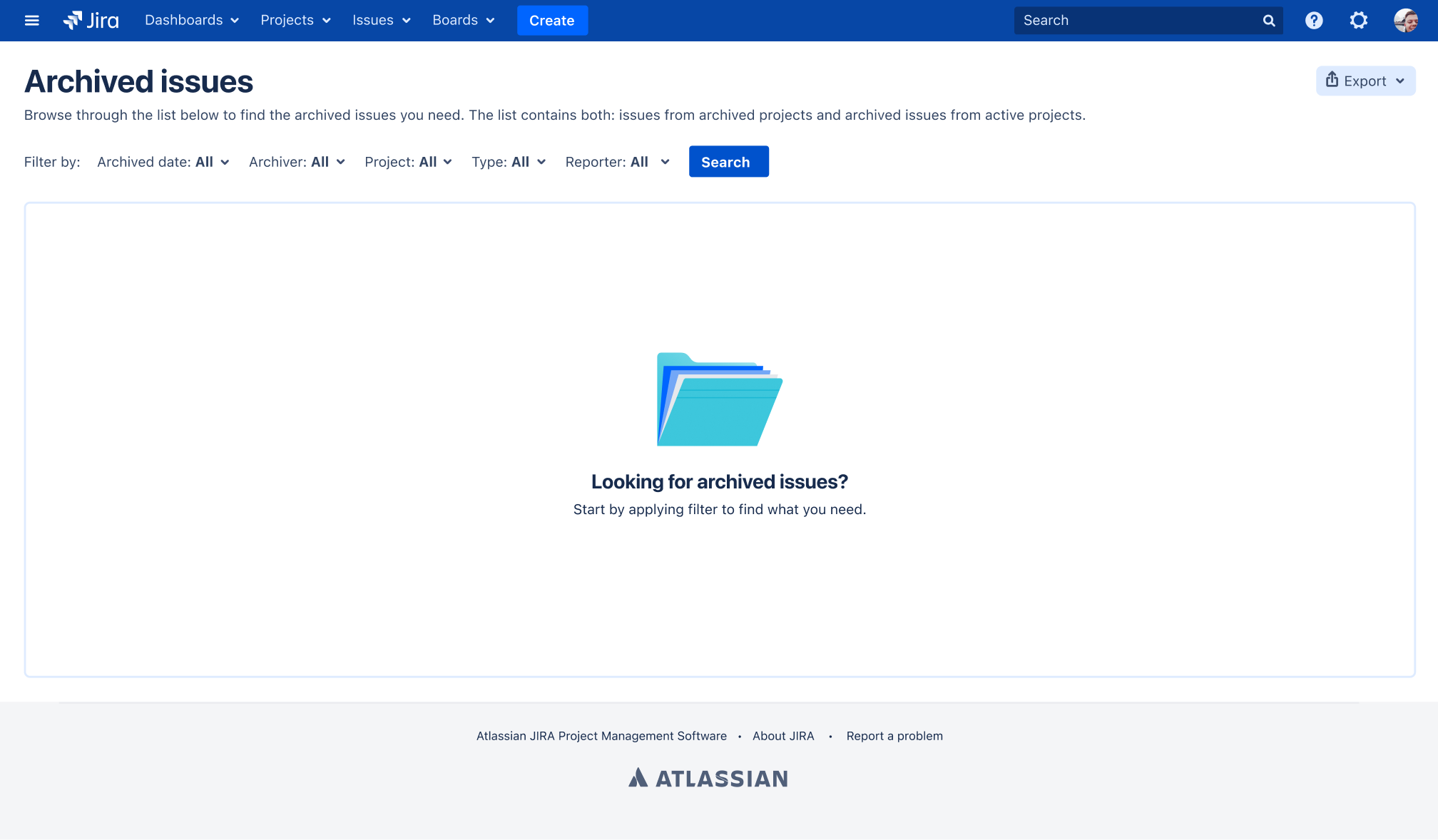
Empty by design. The page opens empty and asks for a filter first: archived date, archiver, project, type or reporter. Loading everything by default would be slow and useless.
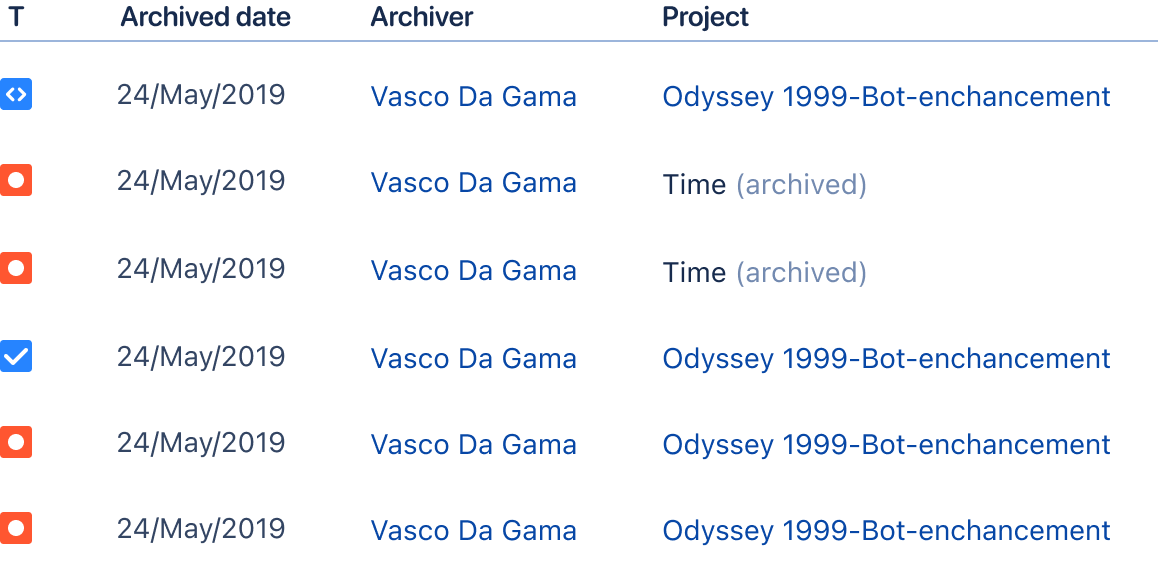
One list for everything archived. Issues from archived projects and archived issues from active projects sit together, with archived projects labelled.
Capped results, with a way out. The page shows the first 1,000 results and says so. For more, admins filter further or export, and a system admin can lift the limit.
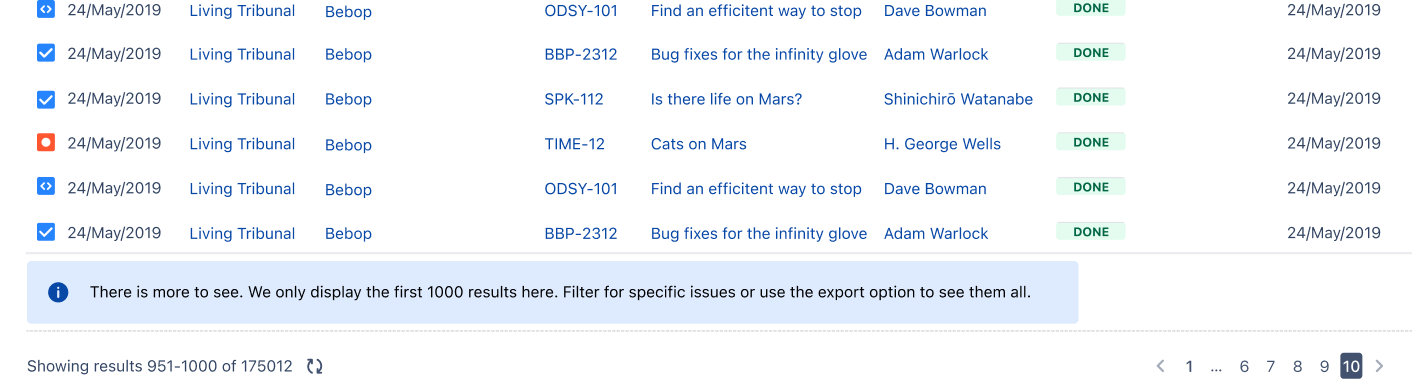
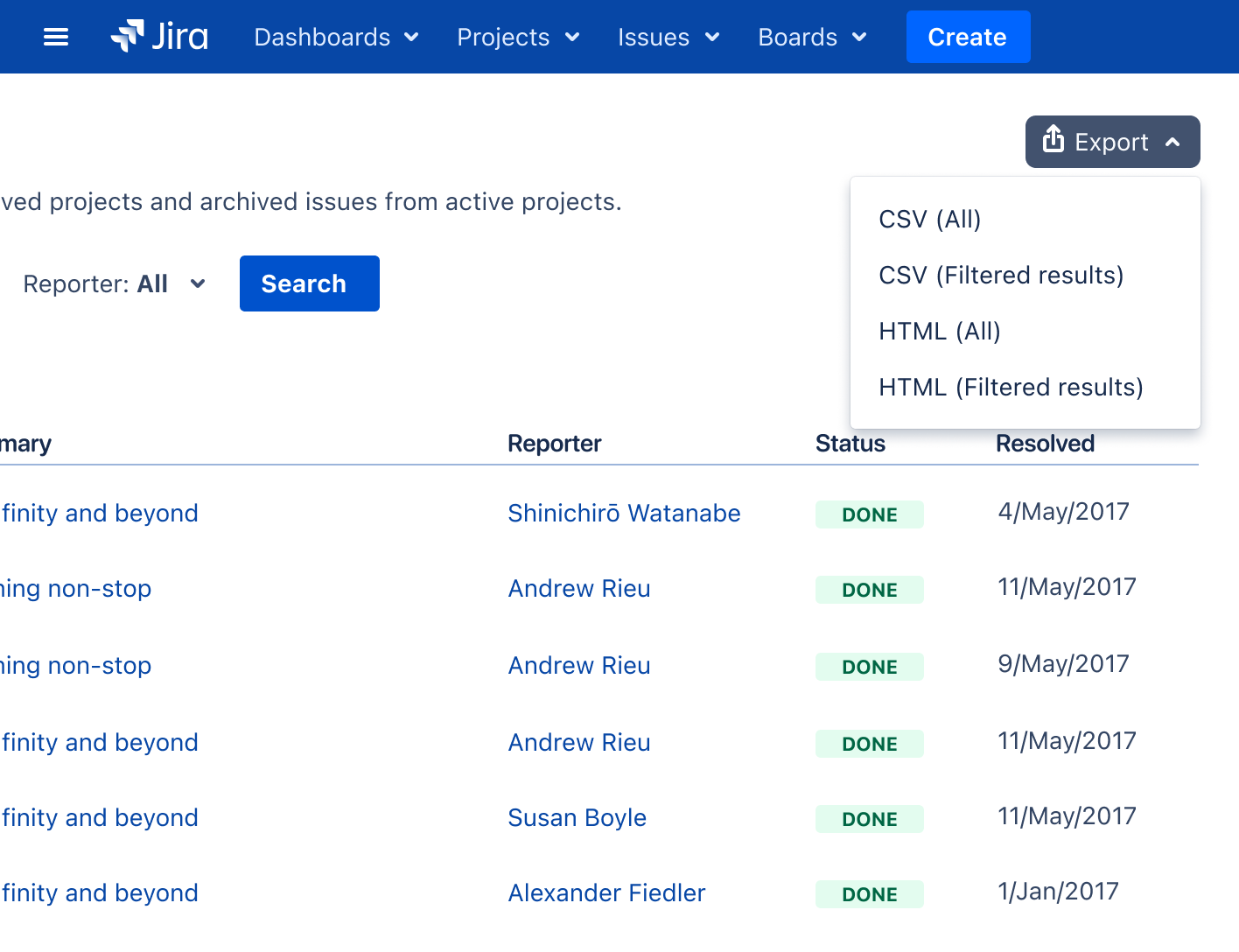
Export for a full check. CSV or HTML, all results or filtered ones: the spreadsheet admins asked for in research.
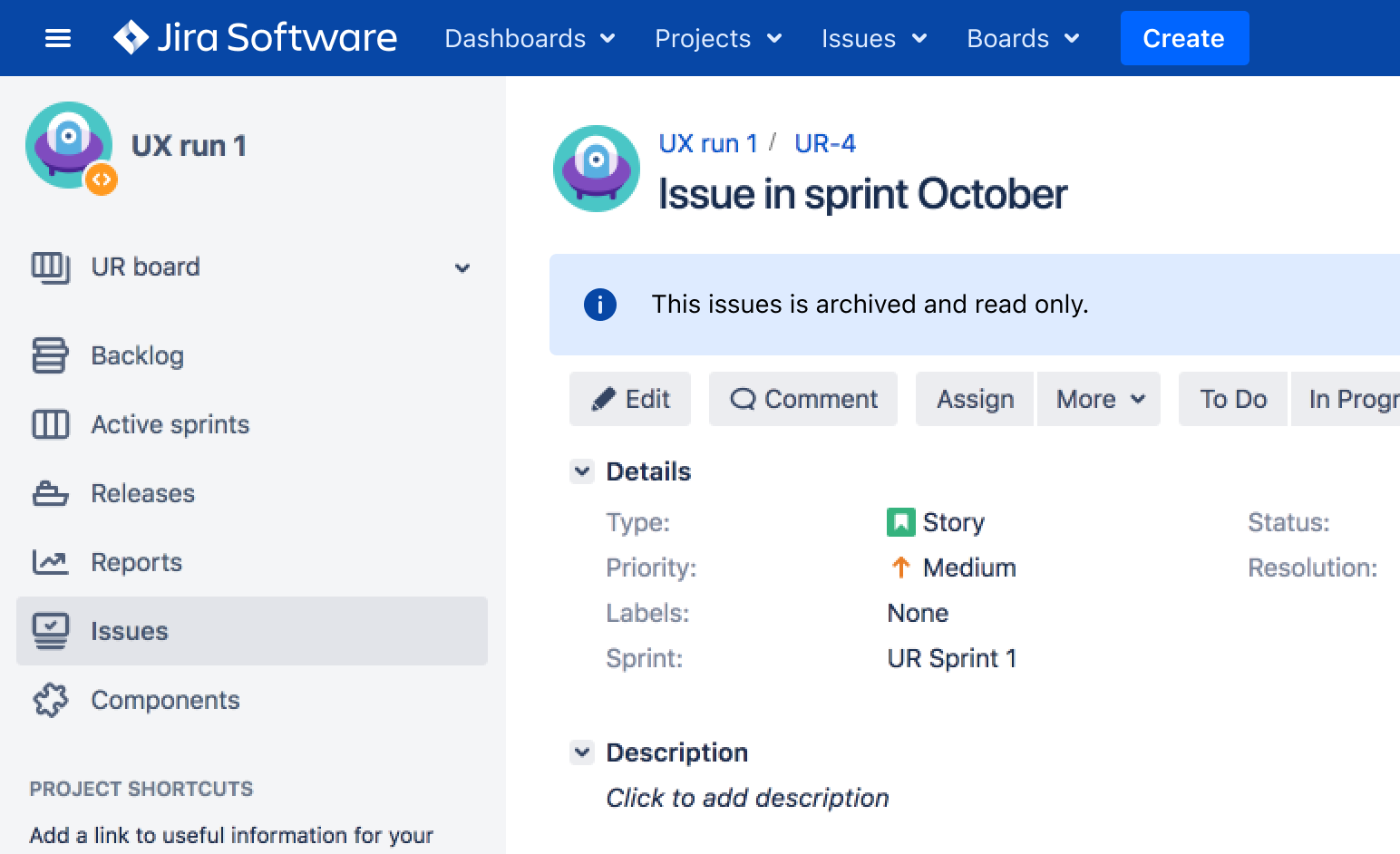
No broken links. An archived issue stays readable through its direct link, marked as archived and read-only, so links pointing to it keep working.
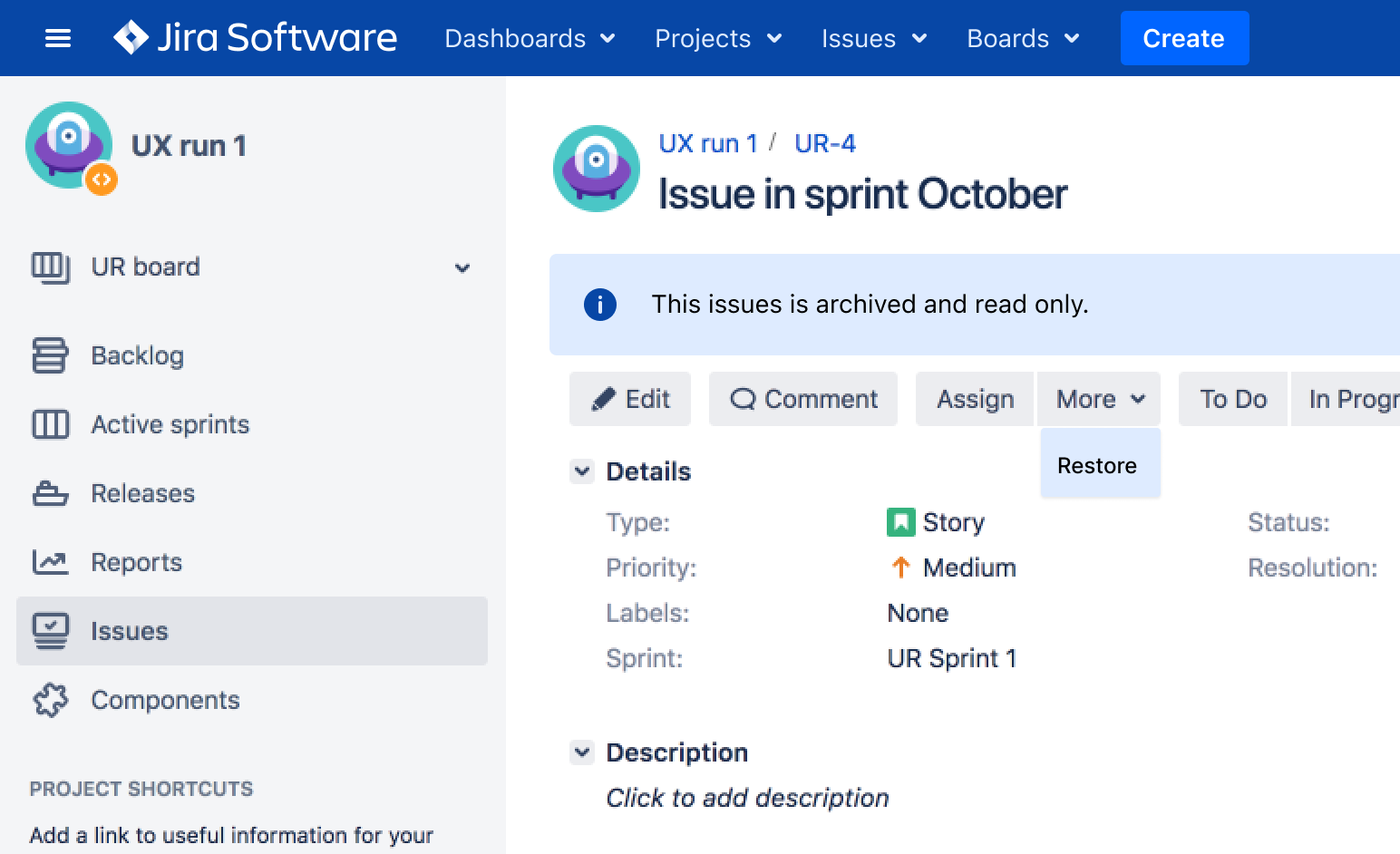
Restore. When a policy turns out to be wrong, admins can bring issues back.
What shipped
Even with a familiar flow, customers moved carefully.
We wouldn’t allow anyone to archive until we get comfortable with the process first
Release plan
The single issue archiving was post-poned a few releases for the admins/companies to get familiar with the process first. Alongside the team worked on API and I together with Technical Writer on creating documentation.
I made sure that major configuration variants of Jira are covered (Software, Service Desk, Data Center) as well as edge cases. Archiving Issues, with and without sub-tasks, behavior of issues within Archived Projects etc. Trust in automation was more important than speed to archive, especially that we planned also API for issue archiving allowing external automation.
Impact
- 1 mln ticketsarchived within 2 months.
- Almost 2× fasterre-indexing: from a full working day to half a day.
- 28% fastersearches.
What I'd do differently
Four lenses kept coming back in the triad: business value, user value, usability and feasibility. We talked about them everywhere, from coffee chats to workshops. Every milestone brought new insights. And the easiest way out was always the same: “let’s build it cheap.”
So I started a hypothesis write-up with my PM and engineering manager. We rated every hypothesis on two scales: confidence (how sure are we?) and criticality (how much does it hurt if we’re wrong?).
Criticality is where we weighed the four lenses. We just never gave them names.
It worked. But it was slow. What counts as “strong” evidence? What makes a risk “high”? We calibrated one debate at a time.
Take this one:
Admins will find issue archiving inside bulk-change, without feature discovery.
- Low confidence
- No one had tested bulk-change with users, and issue archiving was a new feature.
- Critical
- If admins can’t find it, adoption suffers. And with it, user and business value.
We had a bunch of hypotheses like this one: low confidence, but rated high or critical. So we decided to move on to usability testing.
Testing showed that admins found archiving on their own. Feature discovery shipped anyway, as a seatbelt.
Next time, I’d agree on the scales before the first debate. Every insight, technical ones too, goes into one of the four buckets. Each bucket gets its own simple scale:
| Bucket | Low | Mid | High |
|---|---|---|---|
| User value | Opinions and assessments: ours, stakeholders’, estimates | Data: interviews, analytics, sales insights, requests | Test results: usability tests, a beta, launch data |
| Usability | Team judgement | Prototype tested with a few users | Tested with real data, or analytics after launch |
| Feasibility | Gut feel, no spike | Engineering estimate or spike | Working prototype, e.g. on our 7-million-issue test instance |
| Business value | Stakeholder opinion | Sales insights, number of requests | Renewals, revenue or signed commitments |
For user value, I’d borrow Itamar Gilad’s Confidence Meter and simplify it. Opinions count for almost nothing. Data counts for more. A test result beats both.
A shared scale doesn’t replace judgement. It makes the debate shorter. Instead of my opinion against my PM’s, we point at the same scale.
Less arguing. More testing.
What stayed with me
Enterprise leaders asked for high-volume, automated archiving, defined by policies. But most admins had no policy. They needed to see what they were letting go of, and where to find it.
When a system acts at scale on someone’s behalf, showing the evidence matters as much as saving clicks.